
- Home
- How it works
From the files your client saves to the hand worth reviewing.
PokerForge is a Windows app that works entirely from hand-history files on your own computer. Here is what happens to them, step by step.
-
1
Your poker client saves hand histories
Every online room writes a record of each hand you play. PokerForge reads those records. It doesn't connect to the poker room or need your login.
On first launch, the Welcome screen asks for the folders your client saves to. Grosvenor folders are found automatically. PokerForge checks those folders for new hands every time it starts, and while you play, new hands are imported in the background once they're complete.
Ways hands come in
Watched foldersImport › Import Hand Files…Import › Import Hand Folder…Drag files, folders or zips onto the windowGGPoker and CoinPoker zip downloads are opened for you. Hands you already have are skipped, and you get a plain summary of what was imported. Which rooms
-
2
It works out which player is you
Whoever appears in nearly every hand is almost certainly you. PokerForge shows the username and currency it found on a Confirm Your Details screen, so you can correct them before anything is locked in.
GGPoker, Winning Network and CoinPoker label your own seat "Hero" instead of your username. When hands arrive from another room under a different name, PokerForge asks whether that player is you and keeps both names as aliases of one player.
You can change this later
File › SettingsFile › Switch Profile…Separate profiles keep separate databases, for example a real one and the demo.
-
3
It builds a database on your PC
Each hand is turned into the figures you'll see: results by stake and session, positions, showdown and non-showdown winnings, all-in EV, and a record of every decision you made. That decision record is what Leaks and Focus work from.
It all lives in one local folder. Updates keep your hands, settings and aliases, and when a new version needs to recalculate something it makes a backup first.
Where it lives
%APPDATA%\SFPoker\Large histories are fine: beta.10 was tested with more than 800,000 hands.
-
4
You follow a result to the hands behind it
Start from the Dashboard or a session, narrow it down by seat, by spot in Reports, or by opponent, then open the exact hands and step through them in the replayer.
The period, stakes and sites you choose stay the same as you move between pages, so the hands you open always match the number you clicked.
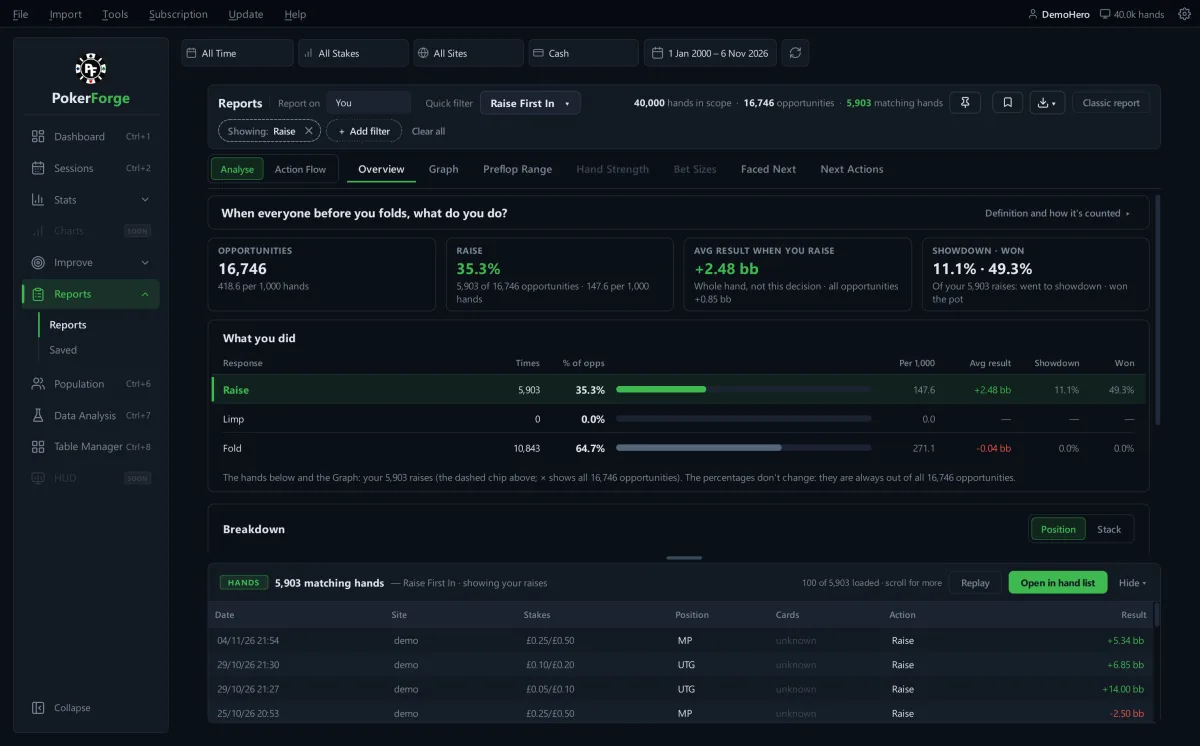
Reports › Raise First In, next update, generated demo hands. Take the tour
-
5
You work on a spot, and it checks
Session Review picks hands worth a second look after each session. In Focus, choose a leak to work on: PokerForge records where you are, sets a target, then checks each new batch of hands and tells you whether you're improving, have fixed it, or have slipped back.
Focus works on cash games. Solver comparisons cover preflop 6-max, 100bb spots. More on Improve
-
6
It stays backed up and current
PokerForge makes automatic daily backups, and you can choose where they go: somewhere like OneDrive or another drive survives a dead hard drive. You can also back up and restore yourself from the Tools menu.
Updates install themselves. The Update menu shows what changed in each version, and the installer is checked against its published checksum before anything runs.
Tools › Backup My Data…Tools › Restore from Backup…Update › Check for Updates…Tools › Verify Database Health…
 PokerForge — Reports
What goes online, exactly.
Your hands never do. These are the only requests the app can make, and none of them includes hand histories, hole cards, player names or your username.
Update check
On by default. Daily, or when you ask.
Downloads a small public version file from pokerforge.app. Turn the daily check off in File › Settings or Update › Current Version.
Anonymous usage ping
Off unless you turn it on.
At most once a day: a random id made on your PC and the app version, so we can tell roughly how many people use PokerForge.
Licence check
Only if you enter a paid licence key.
Once at start-up, the key and nothing else, to confirm the subscription is active. During the free beta there's nothing to enter.
With the daily check off, the ping left off and no licence key, the app makes no automatic network requests. The full detail is in the privacy policy.
Ready when your hand histories are.
Install it, point it at your folders and it starts reading. If you don't have hands to hand, it can load demo data.